




 10 minutes
 Share
ShareBuy Crypto Without Registration
Buying Crypto is now even simpler for users in Georgia. With Cryptal’s updated Convert process, Georgian citizens can buy Crypto without creating an account, logging in, completing the traditional account verification process, or topping up their Cryptal balance beforehand.
Cryptal already offers several ways to buy Crypto, including direct Bank Card purchases, Spot Trade, and Convert. Now, Convert can also be used without registration, making it possible to start the purchase directly from the website and complete the transaction in just a few steps.
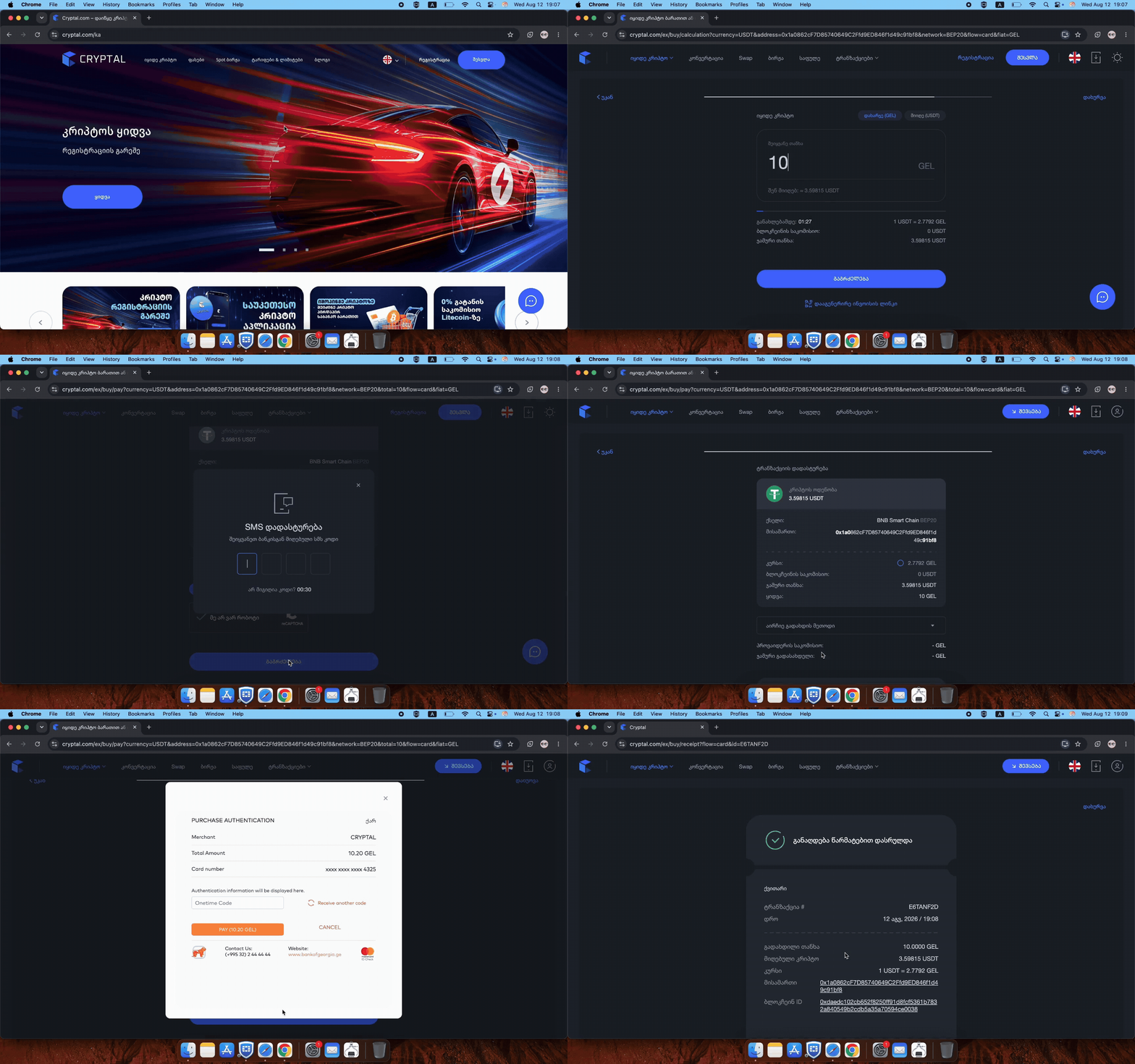
How to Buy Crypto Without Registration on Cryptal – Instructions:
Once you are on the Cryptal website, the purchase process can be completed directly through the Buy Crypto section. You do not need to log in or top up a balance first. Instead, you can select the Crypto Asset, choose your payment currency, enter the required details, and complete the transaction in a few simple steps.
Step 1 – Select “Buy Crypto”
Start by opening the Cryptal website and selecting the Buy Crypto option.
This will take you to the purchase interface, where you can begin setting up the transaction. Since the updated Convert flow is available without traditional account registration, you can start the process immediately without signing in first.
Step 2 – Choose Your Currency
Next, select the fiat currency you want to use for the purchase. Cryptal currently supports three options:
- GEL
- USD
- EUR
Choose the currency you prefer and continue to the next step.
Step 3 – Select the Crypto Asset
After choosing the payment currency, select the Crypto Asset you want to buy.
Cryptal supports around 25 popular Crypto Assets, giving users a range of options depending on what they want to purchase. Some of the most commonly selected assets include:
- Bitcoin (BTC)
- Ethereum (ETH)
- Litecoin (LTC)
- USDT
- Other supported Crypto Assets
Simply choose the asset you want to receive and continue with the transaction.
Step 4 – Enter the Crypto Address
Next, enter the wallet address where you want the purchased Crypto to be sent.
You can use:
- Your personal external Crypto wallet
- Another compatible wallet address
- Your Cryptal wallet, if you prefer to keep the asset within the Cryptal ecosystem
Before continuing, carefully check that the wallet address is correct and compatible with the selected Crypto Asset. Crypto transfers are processed on blockchain networks, so sending funds to an incorrect address or unsupported network can result in the assets being lost.
Once the destination details are correct, you can continue to the next step.
Step 5 – Press “Transfer Coins”
After entering the destination wallet address, press Transfer Coins to continue.
At this stage, Cryptal uses the information you have already selected - including the payment currency, Crypto Asset, and destination address - to prepare the transaction.
Before moving forward, it is a good idea to quickly review the details once again and make sure that:
- The correct Crypto Asset is selected
- The destination wallet address is accurate
- The chosen network is compatible with the receiving wallet
Once everything is correct, press Transfer Coins and proceed to the next stage of the purchase.
Step 6 – Enter the Amount and Continue
Now, enter the amount you want to spend on the Crypto purchase. The value will be calculated based on the fiat currency you selected earlier - GEL, USD, or EUR - and the Crypto Asset you want to receive.
Before continuing, review the transaction information shown on the screen. This allows you to see the purchase details before moving to the identification and payment stages.
Once the amount is correct, press Continue to proceed with the transaction.
Step 7 – Enter Your Georgian ID Number
At this stage, enter your Georgian personal ID number and review the applicable Terms & Conditions before continuing.
This step allows Cryptal to process the purchase without requiring you to create and verify a traditional account in advance. In other words, you can still buy Crypto without registration while completing the required identification directly during the transaction.
After entering your ID number, confirm that you agree to the Terms & Conditions and continue to the next step.
Step 8 – Confirm the SMS Code
After entering your Georgian personal ID number, you will receive an SMS confirmation code.
Enter the code in the required field to confirm your identity and continue with the purchase. This step is part of the transaction confirmation process and helps ensure that the purchase is being completed by the correct user.
Once the SMS code is accepted, you can move on to choosing your preferred payment method.
Step 9 – Choose a Payment Method
Next, select the payment method you want to use to complete the Crypto purchase. Cryptal supports several convenient options:
- Bank Card
- Apple Pay
- Google Pay
- Open Banking
The applicable transaction fee may vary depending on the payment method you choose. Before confirming the payment, Cryptal displays the relevant fee directly on the transaction screen, so you can review the final cost in advance.
For example, Bank Card payments may include a 2.5% fee, while other payment methods can have different conditions.
Choose the option that works best for you, review the payment details, and continue to the final confirmation step.
Step 10 – Confirm the Purchase
In the final step, review the transaction details and confirm the payment.
Before confirming, make sure that the key information is correct:
- The selected Crypto Asset
- The purchase amount
- The destination wallet address
- The chosen payment method
- The applicable transaction fee
Once everything looks correct, confirm the transaction.
After the payment is successfully processed, the purchased Crypto will be transferred to the destination you selected earlier. This means you can complete the entire purchase process without first creating a Cryptal account, logging in, completing traditional account verification, or topping up your balance.
The process is designed to make buying Crypto more direct while still keeping the necessary identity confirmation and transaction checks in place.
What Do You Need Before Buying Crypto?
Buying Crypto without registration means that users no longer need to create and verify a traditional Cryptal account before making a purchase through Convert. Instead, Georgian citizens can start the transaction directly from the website and complete the necessary identification during the purchase process itself.
This removes several preliminary steps that are usually required before buying Crypto, such as:
- Creating a Cryptal account
- Logging in
- Completing account verification
- Topping up the Cryptal balance
- Converting the available balance into Crypto
With the updated process, users can buy Crypto without registration and buy Crypto without verification in the traditional account-based sense. A valid Georgian personal ID number and SMS confirmation are still required during the transaction, but there is no need to complete the full account registration and verification process beforehand.
This makes the purchase process more direct, especially for users who simply want to buy a supported Crypto Asset and either keep it within the Cryptal ecosystem or send it to a desired external wallet.
What Does Buying Crypto Without Registration Mean?
Before starting the purchase, users only need a few basic details and access to a supported payment method. Since there is no need to create and verify a traditional Cryptal account beforehand, the preparation process is relatively simple.
To buy Crypto through the updated Convert flow, you should have:
- A valid Georgian personal ID number
- Access to the phone number used for SMS confirmation
- A preferred payment method
- A compatible Crypto wallet address if you want the purchased Crypto sent outside Cryptal
Users can complete the payment in GEL, USD, or EUR and choose from available methods such as Bank Card, Apple Pay, Google Pay, or Open Banking.
If you prefer to keep the purchased Crypto within the Cryptal ecosystem, you can do so through your Cryptal account. Alternatively, you can send the purchased Crypto directly to a compatible external wallet address of your choice.
Which Crypto Assets Can You Buy Without Registration?
Cryptal gives users access to around 25 popular Crypto Assets through the updated purchase process. This means you are not limited to just one or two options when you buy Crypto without registration.
Some of the most popular available assets include: Bitcoin (BTC), USDT, Litecoin (LTC) and more.
Available Payment Methods
Cryptal supports several payment methods for users who want to buy Crypto without registration. This gives users flexibility to choose the option that is most convenient for them.
Available payment methods include:
- Bank Card
- Apple Pay
- Google Pay
- Open Banking
Do You Need to Top Up Your Cryptal Balance First?
No. One of the main advantages of the updated Convert process is that you do not need to top up your Cryptal balance before buying Crypto.
With the new process, these preliminary steps are not required. You can start the purchase directly from the Buy Crypto section, select your desired Crypto Asset, enter the transaction details, choose a payment method, and complete the purchase.
Can You Send the Purchased Crypto to Another Wallet?
Yes. When buying Crypto through the updated Convert process, users can send the purchased asset to a compatible wallet address of their choice.
This means you can:
- Send the Crypto to your personal external wallet
- Transfer it to another wallet
- Keep it within your Cryptal account
Why Use Convert to Buy Crypto Without Registration?
The updated Convert process is designed for users who want a simpler and more direct way to purchase Crypto without going through the full account setup process first.
The main advantages include:
- No account registration required before purchase
- No traditional account verification process beforehand
- No login required
- No balance top up required
- Support for GEL, USD, and EUR
- Access to around 25 popular Crypto Assets
- Support for Bitcoin, Ethereum, Litecoin, USDT, and other Crypto Assets
- Multiple payment methods, including Bank Card, Apple Pay, Google Pay, and Open Banking
- Ability to send purchased Crypto to a compatible external wallet
- Transaction fees displayed before the final confirmation
For users who simply want to buy Crypto and complete the transaction without creating a full exchange account first, Convert provides a more straightforward alternative.
At the same time, the required identification is still completed during the transaction through a Georgian personal ID number and SMS confirmation, allowing the purchase to remain simple without removing the necessary confirmation steps.
Frequently Asked Questions
- Can I Buy Crypto Without Registration on Cryptal?
Yes. Georgian citizens can use Cryptal’s updated Convert process to buy Crypto without creating a traditional Cryptal account beforehand.
You can start the purchase directly from the website, choose your preferred Crypto Asset, enter the required transaction details, complete identification during the purchase, select a payment method, and confirm the transaction.
- Can I Buy Crypto Without Verification?
Yes, in the sense that you do not need to complete the traditional Cryptal account registration and verification process before making a purchase.
However, identification is still required during the transaction. Users need to enter a valid Georgian personal ID number and confirm the process with an SMS code.
- Can I Buy Bitcoin Without Registration?
Yes. Bitcoin (BTC) is one of the supported Crypto Assets available through the no-registration Convert process.
Users can also choose from other popular assets such as: Ethereum (ETH), Litecoin (LTC), USDT, Other supported Crypto Assets.
- Which Fiat Currencies Can I Use?
Users can complete the purchase using: GEL, USD, EUR.
The selected currency is used to calculate and process the purchase.
Which Payment Methods Are Available?
Available payment options include: Bank Card, Apple Pay, Google Pay and Open Banking.
The applicable fee depends on the payment method and is shown before the transaction is confirmed.
- Are There Transaction Fees?
Yes, fees may apply depending on the selected payment method.
- Do I Need to Top Up My Cryptal Balance?
No. You do not need to top up a Cryptal balance before using the updated Convert process.
The payment is completed directly during the purchase, removing the need to fund an exchange balance first.
- Can I Send the Purchased Crypto to Another Wallet?
Yes. Users can enter a compatible Crypto wallet address and send the purchased asset to their desired destination.
Before confirming the transfer, always verify the wallet address, selected Crypto Asset, and blockchain network carefully.