




 5 minutes
 Share
ShareHow to Check Ethereum (ETH) Transaction?
For anyone using Ethereum, knowing how to check a transaction is an essential skill. Each transfer of ETH or interaction with a smart contract is recorded on the blockchain, but for beginners, the process of verifying it can feel complex.
By learning how to track a transaction, users gain confidence in managing their funds, understanding gas fees, and ensuring transfers reach the intended recipient. Checking Ethereum transactions also helps identify common issues such as pending confirmations, delays caused by low gas fees, or failed transactions due to network congestion. Using the right tools, this process becomes straightforward and accessible even to newcomers.
Whether someone is sending ETH to a friend, participating in a decentralized application, or making their first crypto purchase, transaction tracking offers transparency and peace of mind in an otherwise technical environment.
What is an Ethereum (ETH) Transaction?
An Ethereum transaction is a digital action recorded on the Ethereum blockchain. It can be as simple as sending ETH from one wallet to another, or as advanced as interacting with a smart contract, such as swapping tokens, minting NFTs, or participating in decentralized finance platforms.
Each transaction is initiated by a sender, processed by the network, and confirmed once added to a block by validators. To complete the process, a fee known as gas is required. Gas represents the cost of computational power needed to execute the transaction, and its price can vary depending on network activity.
Every transaction generates a unique identifier, called a transaction hash (TxID), which allows users to track its status in real time. By understanding these basics, even beginners can start to see how transparent and verifiable Ethereum’s system really is.
Tools You Can Use to Track ETH Transactions
Checking an Ethereum transaction requires reliable tools known as block explorers. These platforms allow users to enter a transaction hash and instantly see its progress, including confirmations, sender and receiver addresses, and gas fees. The most commonly used tools include:
- Etherscan – The leading Ethereum block explorer. It provides detailed transaction history, gas tracker, wallet balances, and smart contract interactions.
- Blockchair – A multi-blockchain explorer that supports Ethereum and other major networks. It offers user-friendly charts and filters for deeper analysis.
- Ethplorer – A tool focused on token tracking. It is useful for viewing ERC-20 token movements alongside ETH transfers.
- Wallet Apps – Many modern crypto wallets, such as MetaMask or Trust Wallet, allow users to track ETH transactions without leaving the app.
By using these tools, beginners can gain transparency and confidence in every ETH transfer.
Step-by-Step Guide to Checking ETH Transaction on Etherscan
For beginners, the easiest way to check an Ethereum transaction is by using Etherscan, the most popular block explorer. The process is simple and requires only the transaction hash (TxID). Here’s how to do it step by step:
- Step 1 – Get the Transaction Hash
Copy the TxID from your wallet or exchange after making a transfer. - Step 2 – Open Etherscan.io
Visit the official website and locate the search bar at the top of the page. - Step 3 – Paste the Transaction Hash
Enter your TxID in the search bar and press enter to view results. - Step 4 – Review the Transaction Details
Check the status (success, pending, or failed), number of confirmations, gas fee, and wallet addresses involved.
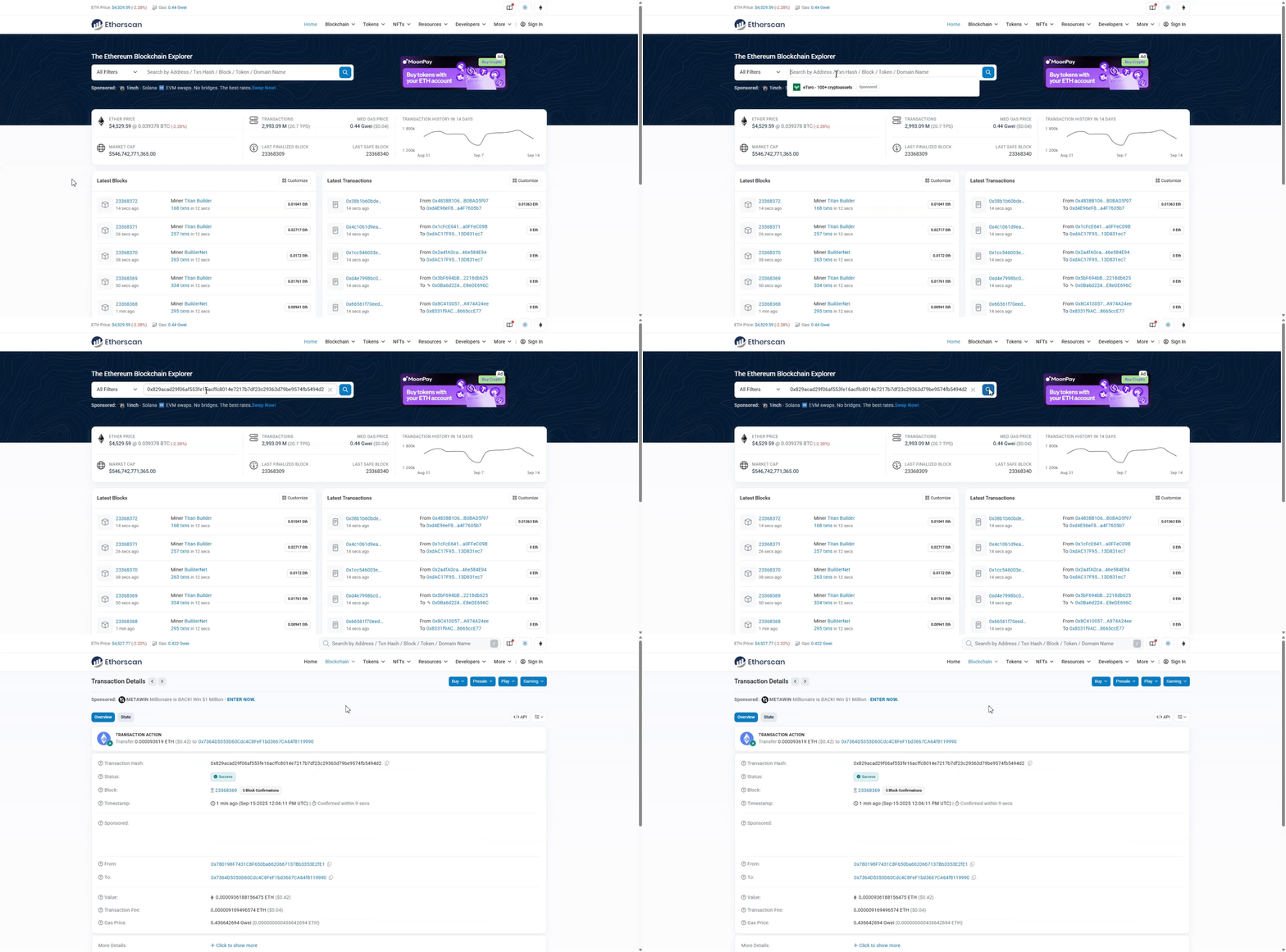
Following these steps ensures users can quickly verify the outcome of any Ethereum transfer.
How to Understand Transaction Details
Once a transaction is found on Etherscan or another explorer, beginners may feel overwhelmed by the information displayed. However, each field has a clear purpose. The most important detail is the transaction status.
If it shows “Success,” the transfer is complete. A “Pending” status means it is still waiting for confirmations, while “Failed” indicates the transaction did not go through, often due to insufficient gas.
Another key element is the block number, which shows in which block the transaction was recorded. Users should also pay attention to the sender and recipient addresses, ensuring the funds were directed to the correct wallet.
The gas fee indicates how much ETH was paid to process the transfer, and high network activity can cause this fee to rise. By learning to interpret these details, users gain better control and confidence when navigating the Ethereum network.
Common Issues and How to Solve Them
While Ethereum transactions are usually reliable, beginners often face common issues. One frequent problem is when a transaction remains pending for too long. This usually happens if the sender set a low gas fee, making the transaction less attractive to validators.
In such cases, users can either wait for the network to clear or resend the transaction with a higher fee. Another issue is a failed transaction, which occurs when the gas limit is too low or the smart contract execution runs out of resources.
Although failed transfers do not move funds, the gas fee is still charged. Sometimes users also worry if they accidentally sent ETH to the wrong address.
Unfortunately, blockchain transactions are irreversible, so double-checking wallet details before sending is essential. By understanding these issues, users can troubleshoot problems quickly and avoid unnecessary stress.
Safety Tips When Checking ETH Transactions
When verifying Ethereum transactions, security should always be the top priority. Since blockchain data is public, many websites claim to offer tracking services, but not all of them are trustworthy. To stay safe, beginners should follow these essential tips:
- Use official explorers such as Etherscan or Blockchair. Avoid clicking unknown links.
- Check the website URL carefully to prevent falling for phishing pages that mimic real explorers.
- Never share private keys or seed phrases when tracking a transaction. Block explorers only require the transaction hash, nothing else.
- Bookmark trusted explorers in your browser to reduce the risk of typing errors or landing on fake sites.
- Be cautious with wallet apps and only download them from official app stores or the project’s verified website.
By applying these safety practices, users can track transactions confidently without exposing their funds to unnecessary risks.
Conclusion
Checking Ethereum transactions is a simple yet powerful habit that helps users build trust and confidence when using digital assets. With tools like Etherscan and other reliable explorers, anyone can verify the status of a transfer in just a few steps.
Understanding transaction details such as status, block number, addresses, and gas fees allows beginners to recognize whether a transfer was successful or if issues need attention. By knowing how to interpret this information, users are better equipped to avoid confusion, solve problems like delays or failed transactions, and maintain a smooth experience on the Ethereum network.
Most importantly, applying basic safety measures ensures that tracking remains secure and free from unnecessary risks. For those starting their journey with ETH, transaction checking is not just a technical task, it is an essential skill for managing funds responsibly.